New Hire Old Artifacts TryHackMe Writeup
Investigate the intrusion attack using Splunk.
Investigate the intrusion attack using Splunk.
Investigate the intrusion attack using Splunk.
Room: https://tryhackme.com/room/newhireoldartifacts
Scenario
You are a SOC Analyst for an MSSP (managed Security Service Provider) company called TryNotHackMe.
A newly acquired customer (Widget LLC) was recently onboarded with the managed Splunk service. The sensor is live, and all the endpoint events are now visible on TryNotHackMe’s end. Widget LLC has some concerns with the endpoints in the Finance Dept, especially an endpoint for a recently hired Financial Analyst. The concern is that there was a period (December 2021) when the endpoint security product was turned off, but an official investigation was never conducted.
Your manager has tasked you to sift through the events of Widget LLC’s Splunk instance to see if there is anything that the customer needs to be alerted on.
Happy Hunting!
Initial Setup
To be thorough, I set Splunk’s search range to All Time. Although December 2021 was the suspected window, threats often install persistence or drop other artifacts that persist beyond initial compromise.
A Web Browser Password Viewer executed on the infected machine. What is the name of the binary? Enter the full path.
An attacker’s first move after gaining access is often credential theft. A common way to do this is using tools that dump passwords saved in web browsers. A simple keyword search is a great place to start.
1
password viewer
This query returned 27 events. In the event details, the ImageLoaded field reveals the full path of the executed process.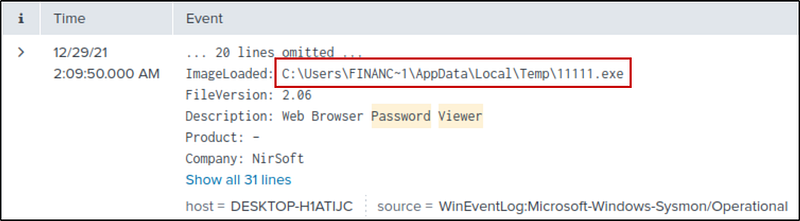
What is listed as the company name?
The Company field gives us the answer directly.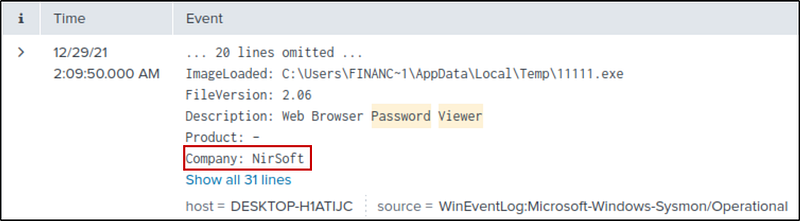
Another suspicious binary running from the same folder was executed on the workstation. What was the name of the binary? What is listed as its original filename? (format: file.xyz,file.xyz)
Since it’s the same path, I copied and searched for it.
1
CurrentDirectory="C:\\Users\\FINANC~1\\AppData\\Local\\Temp\\"
I got 5000+ events. Then I looked at the hint. It says that
1
File path should include username in long name format. https://docs.microsoft.com/en-us/windows/win32/fileio/naming-a-file
Then I changed the username in long name format.
1
CurrentDirectory="C:\\Users\\Finance01\\AppData\\Local\\Temp\\"
Now, let’s look for the Image and its OriginalFileName using a table
1
CurrentDirectory="C:\\Users\\Finance01\\AppData\\Local\\Temp\\"| table Image OriginalFileName
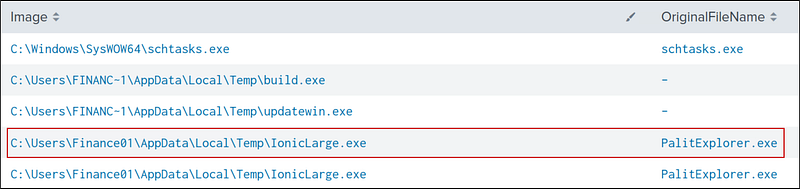
IonicLarge.exe is the suspicious file, and PalitExplorer.exe is its original Name.
The binary from the previous question made two outbound connections to a malicious IP address. What was the IP address? Enter the answer in a defang format.
Let’s select the binary.
1
Image=”C:\\Users\\Finance01\\AppData\\Local\\Temp\\IonicLarge.exe”
Now, let’s look at the DestinationIp with two connections.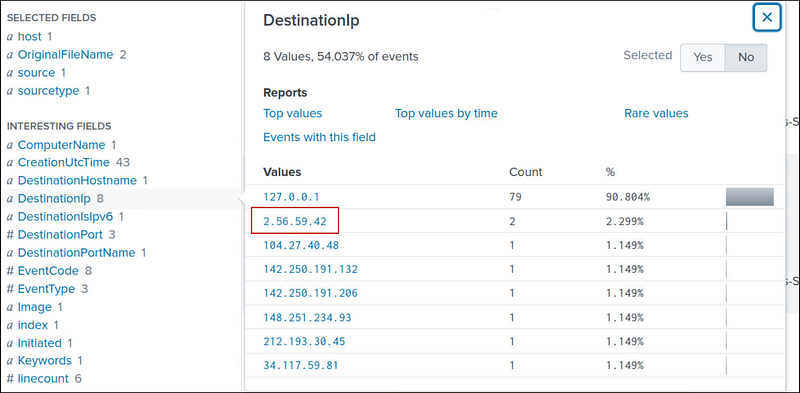
We can defang it using CyberChef (https://gchq.github.io/CyberChef/)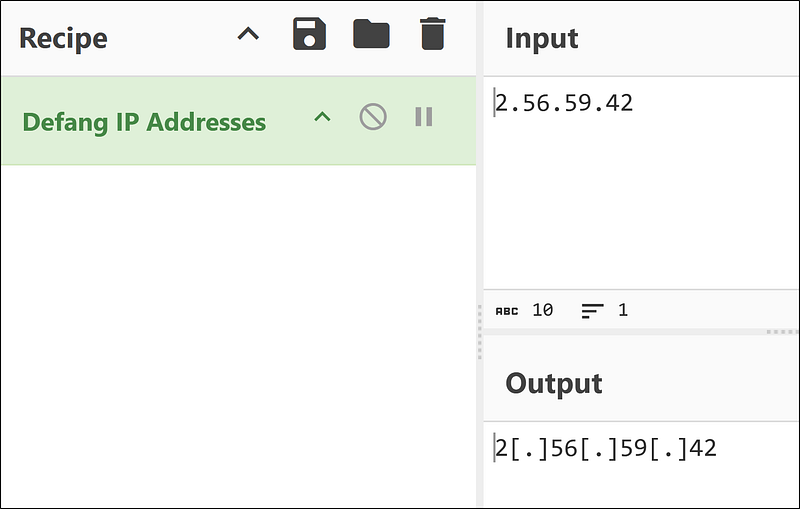
The same binary made some change to a registry key. What was the key path?
Event ID 13 records modifications to registry values. Let’s filter according to it.
1
Image=”C:\\Users\\Finance01\\AppData\\Local\\Temp\\IonicLarge.exe” EventCode=13
We have nine events. Look at the messages; they all work with the same key path: HKLM\SOFTWARE\Policies\Microsoft\Windows Defender.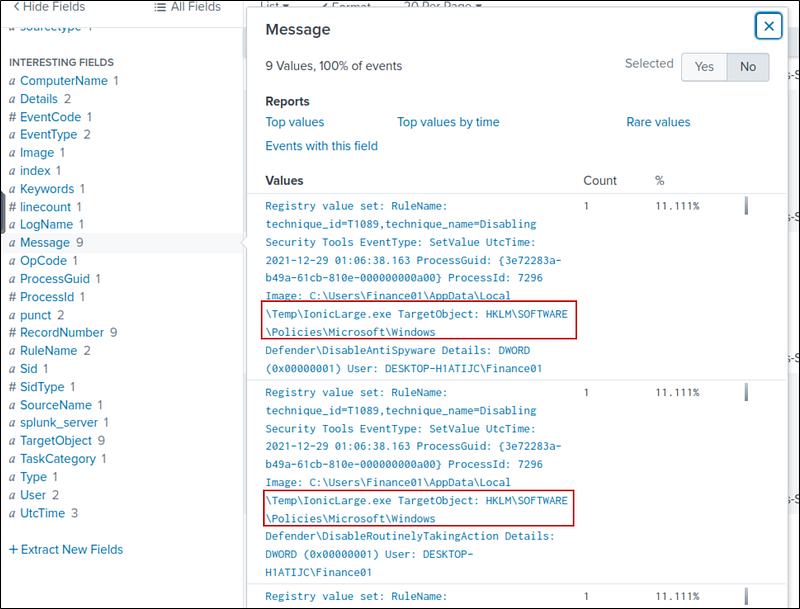
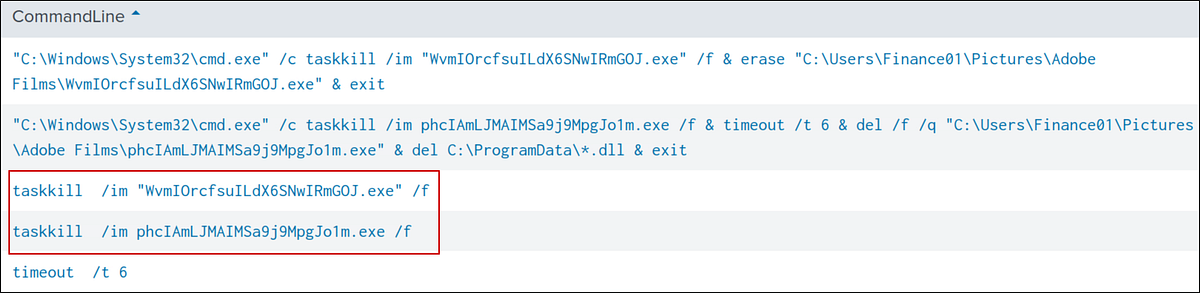
Some processes were killed and the associated binaries were deleted. What were the names of the two binaries? (format: file.xyz,file.xyz)
The hint says that
1
Process were killed with ‘taskkill /im’
So, I searched for taskkill and got 12 events. Then I created a table with the CommandLine filter.
taskkill| table CommandLine
The two deleted binaries are:
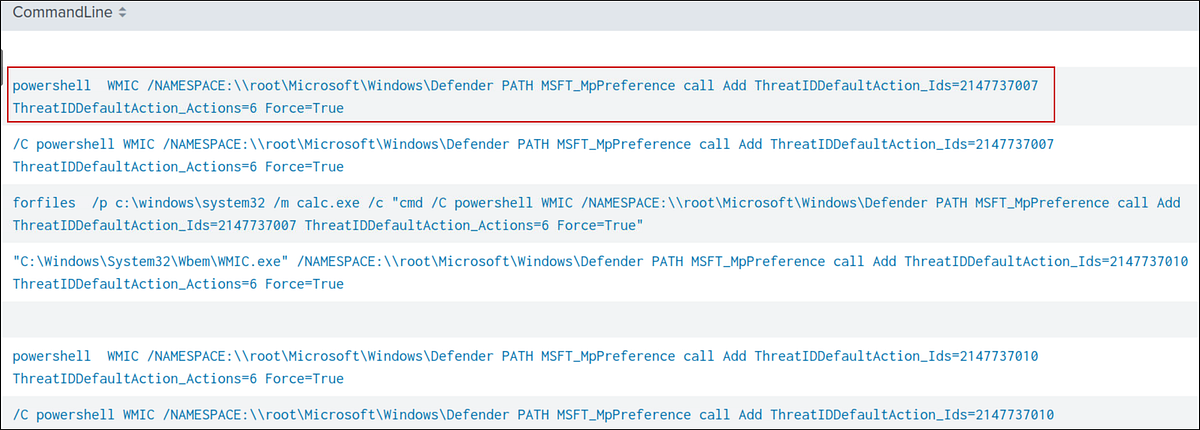
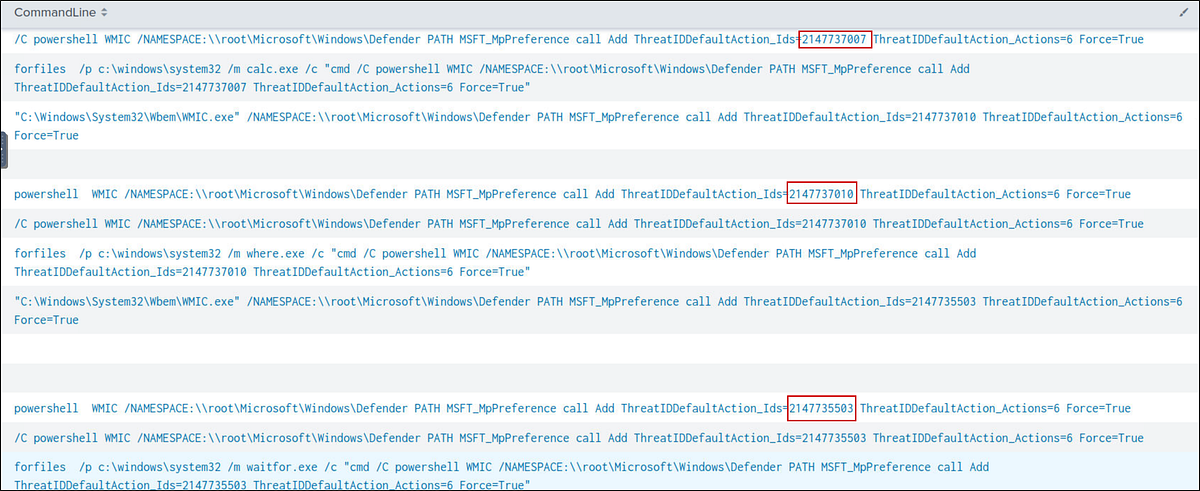
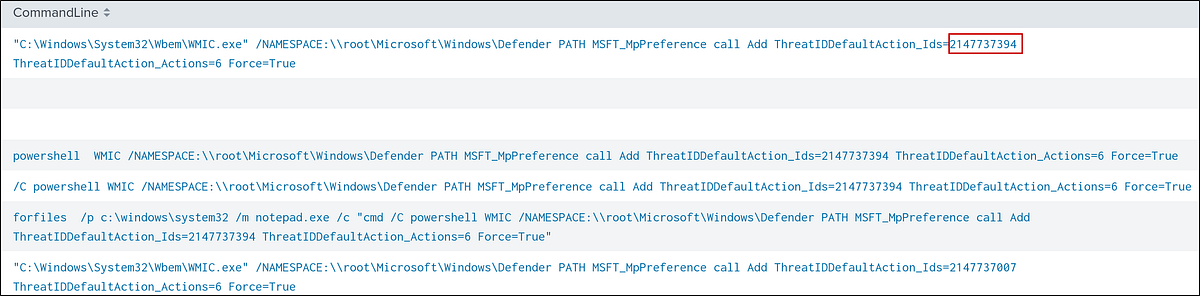
The attacker ran several commands within a PowerShell session to change the behaviour of Windows Defender. What was the last command executed in the series of similar commands?
I just searched for PowerShell Windows Defender and got 29 events. Then, I made a table with the CommandLine and selected the most recent command.
powershell windows defender| table CommandLine
Based on the previous answer, what were the four IDs set by the attacker? Enter the answer in order of execution. (format: 1st,2nd,3rd,4th)
In the same results from the previous query, we can get the IDs: 2147735503,2147737010,2147737007,2147737394
Another malicious binary was executed on the infected workstation from another AppData location. What was the full path to the binary?
Let’s search for AppData in the search and create a table for images without duplicates.
*AppData*| dedup Image| table Image
I got 59 results. EasyCalc.exe looked suspicious — and this was our required binary.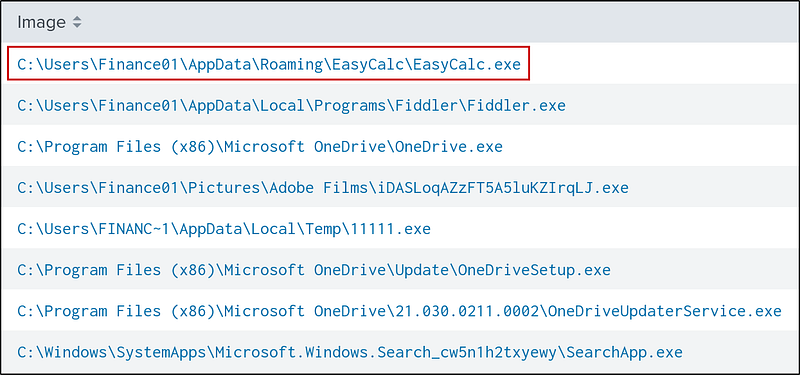
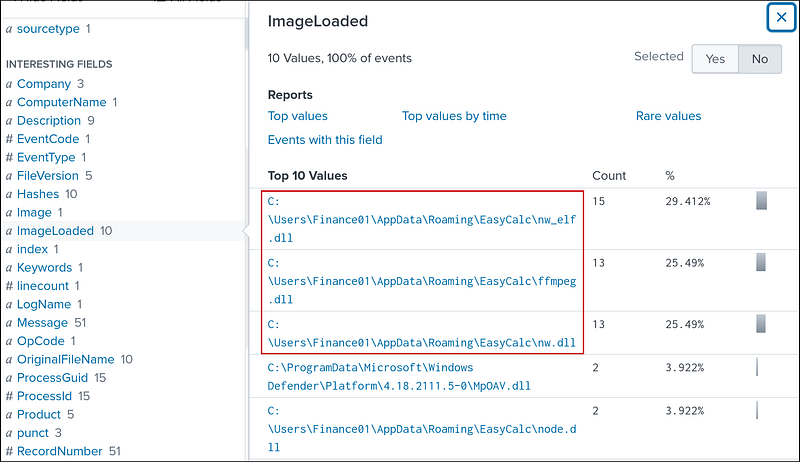
What were the DLLs that were loaded from the binary from the previous question? Enter the answers in alphabetical order. (format: file1.dll,file2.dll,file3.dll)
Add the path from the previous question to the search and a .dll to the query. We get 66 results. Look at the ImageLoaded filter, we get the required DLLs:ffmpeg.dll, nw.dll, and nw_elf.dll
1
Image=”C:\\Users\\Finance01\\AppData\\Roaming\\EasyCalc\\EasyCalc.exe” .dll
Final Thoughts
Our threat hunt successfully reconstructed a classic attack chain. The evidence uncovered in Splunk shows the attacker progressing from initial credential harvesting (WebBrowserPassView) to executing a renamed payload (IonicLarge.exe). From there, they performed defense evasion by terminating security services and altering Windows Defender policies via PowerShell. The final stage involved deploying a secondary payload (EasyCalc.exe) for persistent access.